


Cathay Pacific offers 21 special meals, and you can order one in Manage Booking at least 24 hours before your flight. It takes three steps, and you can save your choice for every future Cathay Pacific flight. To choose a meal, check our list of Cathay Pacific special meals and their codes.
Before You Start
You’ll need your family name, given name and booking reference. Order as early as you can, and at least 24 hours before departure. On flights to and from Bangladesh, Indonesia, Malaysia and the Middle East, all meals are prepared without pork or alcohol, but if you follow a halal diet, ordering the Muslim meal is still the safest option.
How To Pre Order
- 1
Access Your Booking
Go to cathaypacific.com and tap Manage Booking. If you’re not a Cathay member, tap Find booking as a guest.

- 2
Booking Details
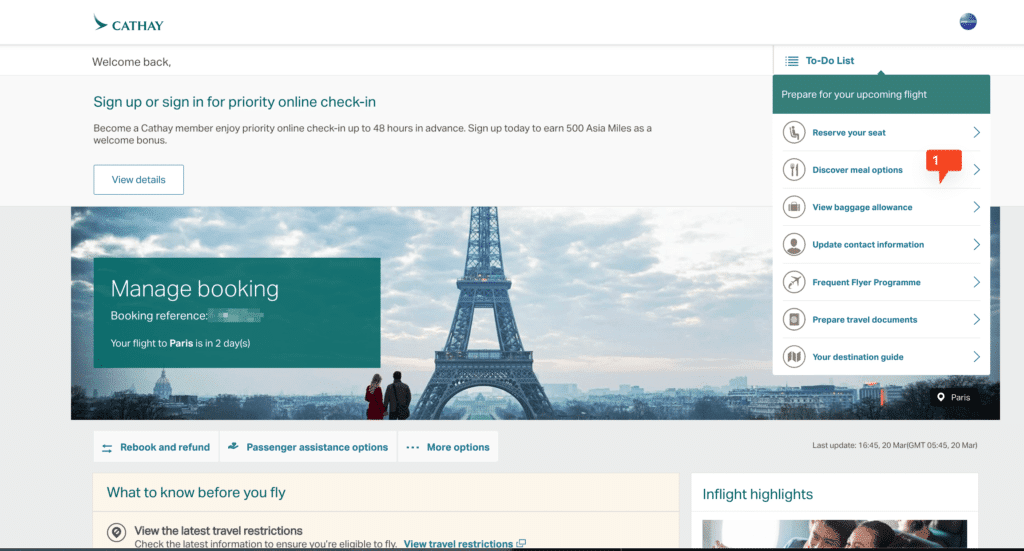
Enter your family name, given name and booking reference. On the Manage Booking page, tap Discover Meal Options.
- 3
Choose Your Meal
Tap the Special Meal button to see every meal available, choose yours and tap Request. To get the same meal on every future Cathay flight, tick Save my preferences for all flights operated by Cathay Pacific.



What Happens Next
You should see a confirmation page, and your meal will be ready on your flight. If you saved your preferences, the same meal will be ordered automatically on future Cathay flights. If anything goes wrong, contact Cathay Pacific Customer Care.
FAQs
Can I save my special meal for future Cathay Pacific flights?
Yes. When you order, tick Save my preferences for all flights operated by Cathay Pacific.
What if I miss the 24-hour deadline?
Contact Cathay Pacific Customer Care and ask, although a meal can’t be guaranteed.